
There is no official VillaSpin app in the App Store or Google Play. The casino runs in mobile browsers on iPhone, iPad and Android with the same content as on desktop: the Lobby, Slots and Live tabs, the sportsbook, Promotions, the Premium Shop, Tournaments and the cashier. A home-screen shortcut from Safari or Chrome opens the site full-screen, so it looks and works much like an app without a download. Mobile deposits are quickest with Apple Pay or Google Pay, both shown in the banner above the lobby. Files offered online as a "VillaSpin APK" do not come from the operator.
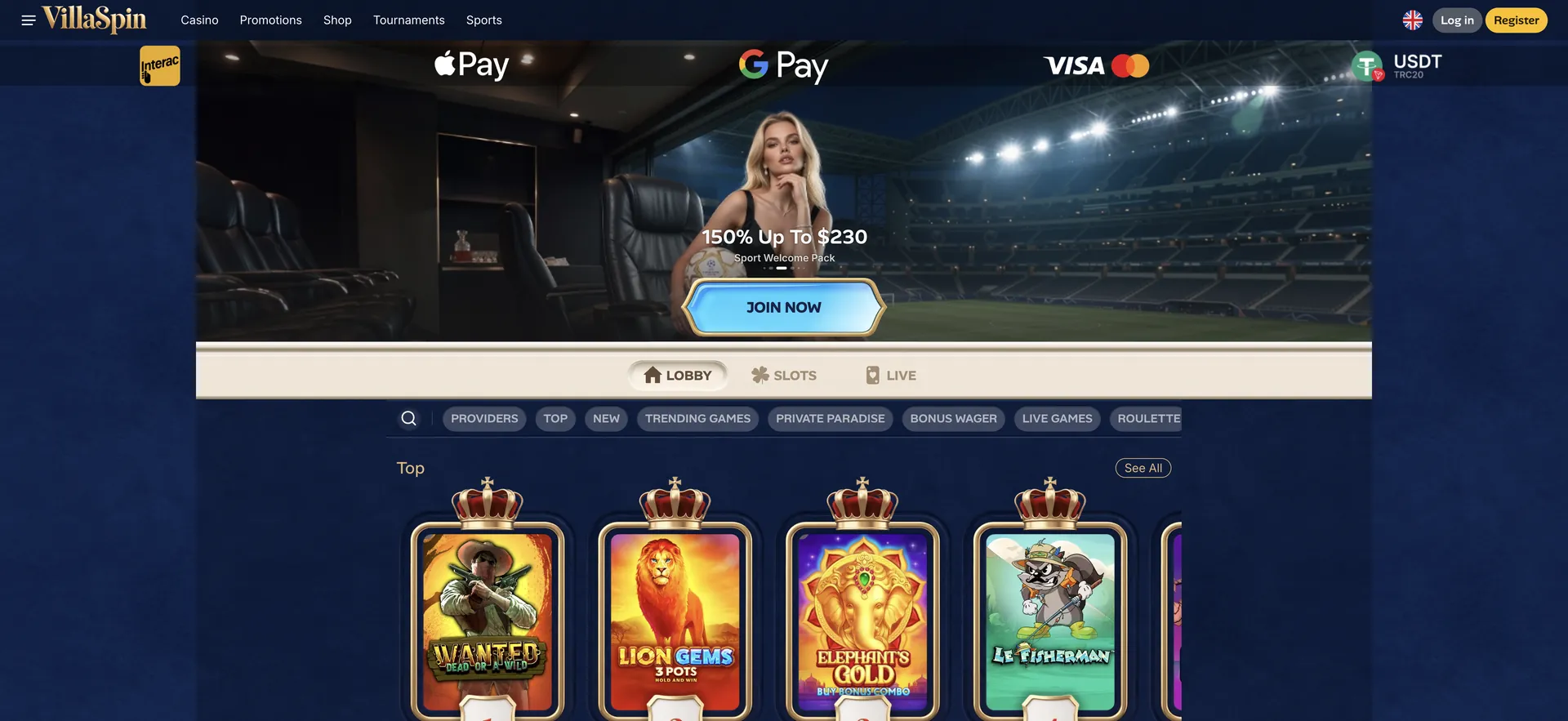
VillaSpin on iPhone and iPad
On iOS the shortcut is created from Safari:
- Open Safari and go to the official VillaSpin site.
- Check the footer for the Win Top Ltd company details and licence ALSI-202509029-FI1.
- Tap the share icon at the bottom of the screen.
- Choose "Add to Home Screen".
- Keep or edit the name and tap "Add".
- Open VillaSpin from the new icon and log in with email and password.
VillaSpin on Android
On Android the option sits in the Chrome menu:
- Open Chrome and go to the official VillaSpin site.
- Tap the three dots in the top right corner.
- Choose "Add to Home screen" or "Install".
- Confirm; the icon appears among the other apps.
- Open it and log in as usual.
APK safety
VillaSpin offers no APK file on its site. Files called "VillaSpin APK" on third-party pages are not from the operator and can contain malware that reads stored passwords or payment details. Installing them also means allowing apps from unknown sources, which weakens the phone's protection. The browser shortcut gives the same functions without that risk.
If the app cannot be found
Searches for a VillaSpin app in the stores show unrelated games or nothing at all. That is expected: no store app exists. The steps that solve most access problems are simpler:
- Use the browser shortcut instead of searching the stores.
- Update iOS, Android and the browser to the latest version.
- Clear the browser cache if the site loads incorrectly.
- Switch between Wi-Fi and mobile data if live games stall.
- Turn off any VPN: the site blocks visitors whose location cannot be confirmed.
Features on mobile
The mobile site carries the full desktop content:
- Casino: all rows, including Top, New, Private Paradise, Jackpots and Buy Bonus.
- Live casino: roulette, blackjack and game shows.
- Sportsbook: Popular, Live and Upcoming, Hot Combos and the Quick Bet toggle.
- Promotions: welcome packs, Cases, WinStreak and Activate Promocode.
- Shop and Tournaments: Chips, rewards and the live leaderboards.
- Account: cashier, verification uploads and limits.
Game rows scroll sideways, with "See All" for full lists. Slots open full-screen in portrait or landscape, depending on the game. Identity documents can be photographed and uploaded straight from the camera.
Mobile bonuses
VillaSpin has no app-only bonus. All offers, including the 500% casino pack with 620 free spins, the crypto, VIP and sport packs, tournaments and the Premium Shop, are the same on mobile and desktop. The VillaSpin bonus page covers them in detail.
Mobile payments
Payments on a phone use the same cashier as on desktop. The account runs in euros or USDT, so the pound amounts below are conversions:
| Method | Deposit | Withdrawal | Note |
|---|---|---|---|
| Apple Pay | Yes | Not confirmed | Quickest on iPhone |
| Google Pay | Yes | Not confirmed | Quickest on Android |
| Visa, Mastercard debit | Yes | Usually yes | Bank may add a non-sterling fee |
| USDT (TRC20) | Yes | Yes | Needs a crypto wallet app |
Minimum deposits, according to overviews, start at about £21 for the casino pack and 30 USDT for the crypto pack.
Performance on mobile
The site is built responsively, so the layout adapts to the screen rather than shrinking the desktop page. Slots load in a few seconds on a 4G or 5G connection and use relatively little data. Live dealer games stream video and use noticeably more data, around several hundred megabytes an hour depending on quality, so Wi-Fi is the better choice for long live sessions. Older phones may struggle with games that have heavy animations; closing other apps and keeping the browser updated helps. Battery use rises during live streams and long slot sessions, which is worth keeping in mind away from a charger.
Shortcut or app: the difference
A home-screen shortcut opens the website without the browser's address bar, so it looks like an app. Updates happen automatically, because the shortcut always loads the current site. Push notifications are not available, and the shortcut uses the browser's saved login. Compared with a store app, the main practical difference is that there is nothing to download, update or uninstall, and no extra permissions are requested.
Login and account security
A phone is easier to lose than a laptop, so a few habits protect the account:
- Use a strong password that is not used anywhere else.
- Lock the phone with a PIN, fingerprint or face recognition.
- Log out on shared devices and avoid saving the password in a shared browser.
- Open the site only from the home-screen shortcut or a typed address, not from links in messages.
- Use "Forgot your password?" on the login form if access is lost.
- Contact support at once if unknown activity appears in the account.
Limits and breaks on mobile
Playing on a phone is quick, which makes session control more important. Deposit limits for a day, week or month are set in the account and apply on every device. A timer or screen-time limit on the phone itself adds a reminder after a set period. Notifications from banking apps for each payment to the casino show spending in real time. The Self Exclusion page in the footer covers longer breaks from the account.
Switching between devices
The account, balance, bonuses and tournament progress are stored on the server, so play started on a phone continues on a laptop after logging in there.
FAQ
Common questions about the VillaSpin app.
Is there a VillaSpin app for iPhone?
No. VillaSpin works in Safari and can be added to the home screen as a shortcut.
Is there a VillaSpin APK for Android?
No official APK exists. Files with that name come from third parties and are not safe to install.
Do all games work on mobile?
The games in the lobby are built for mobile browsers; live tables need a stable connection.
Can withdrawals be made from a phone?
Yes. The cashier works the same on mobile, including document uploads for verification.